게임 프로그래머 입문 올인원 강의 수강 후 복습용으로 작성
1. 프로젝트 폴더 관리
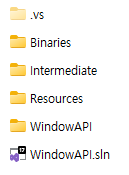
1) 폴더 생성
- Resources : 사운드 파일, 아트 리소스 등을 담는 폴더
- Binaries : 빌드한 결과물이 저장되는 폴더
- Intermediate : 중간에 만들어지는 파일을 담는 폴더
2) 디렉터리 경로 변경
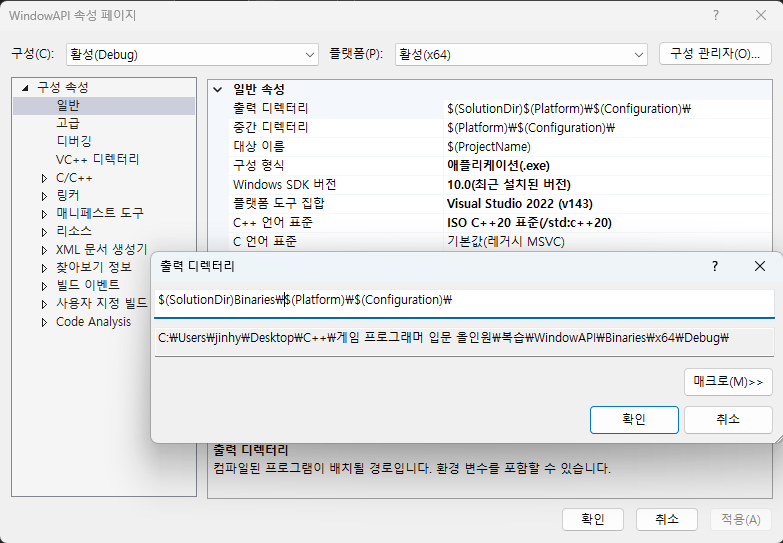
- 프로젝트 우클릭 > 속성 > 일반 > 출력 디렉터리 / 중간 디렉터리 > 편집 > 원하는 경로 입력
2. Resource 사용하기
1) ResourceManager 수정
- ResourceManager를 사용하는 이유는? 한 번만 로드해서 여러 번 사용하기 위해 (Object와 다름)
// ResourceManager.h

#pragma once

class ResourceBase;
class Texture;

class ResourceManager
{
public:
	DECLARE_SINGLE(ResourceManager);

	~ResourceManager();

public:
	void Init(HWND hwnd, fs::path resourcePath);
	void Clear();

	const fs::path& GetResourcePath() { return  _resourcePath; }

	Texture* GetTexture(const wstring& key) { return _textures[key]; }
	Texture* LoadTexture(const wstring& key, const wstring& path, uint32 transparent = RGB(255, 0, 255));

private:
	HWND _hwnd;
	fs::path _resourcePath;

	unordered_map<wstring, Texture*> _textures;
};
// ResourceManager.cpp
#include "pch.h"
#include "ResourceManager.h"
#include "Texture.h"
ResourceManager::~ResourceManager()
{
Clear();
}
void ResourceManager::Init(HWND hwnd, fs::path resourcePath)
{
_hwnd = hwnd;
_resourcePath = resourcePath;
}
void ResourceManager::Clear()
{
for (auto& item : _textures)
SAFE_DELETE(item.second);
_textures.clear();
}
Texture* ResourceManager::LoadTexture(const wstring& key, const wstring& path, uint32 transparent)
{
if (_textures.find(key) != _textures.end())
return _textures[key];
fs::path fullPath = _resourcePath / path;
Texture* texture = new Texture();
texture->LoadBmp(_hwnd, fullPath.c_str());
texture->SetTransparent(transparent);
_textures[key] = texture;
return texture;
}
2) pch.h 에 filesystem 추가
// pch.h

#include <filesystem>
namespace fs = std::filesystem;
3) Game.cpp 에서 Init() 할 때 경로 넣어주기
// Game.cpp

void Game::Init(HWND hwnd)
{
	// ...
	GET_SINGLE(ResourceManager)->Init(hwnd, fs::path(L"C:\\원하는\\경로\\입력\\Resources"));
	// ...
}
4) Vector 별칭 추가
// Types.h

// ...
struct VectorInt
{
	VectorInt() {}
	VectorInt(int32 x, int32 y) : x(x), y(y) {}
	VectorInt(POINT pt) : x((int32)pt.x), y((int32)pt.y) {}

	VectorInt operator+(const VectorInt& other)
	{
		VectorInt ret;
		ret.x = x + other.x;
		ret.y = y + other.y;
		return ret;
	}

	VectorInt operator-(const VectorInt& other)
	{
		VectorInt ret;
		ret.x = x - other.x;
		ret.y = y - other.y;
		return ret;
	}

	void operator+=(const VectorInt& other)
	{
		x += other.x;
		y += other.y;
	}

	void operator-=(const VectorInt& other)
	{
		x -= other.x;
		y -= other.y;
	}

	float Dot(VectorInt other)
	{
		return x * other.x + y * other.y;
	}

	float Cross(VectorInt other)
	{
		return x * other.y - other.x * y;
	}

	int32 x = 0;
	int32 y = 0;
};

using Pos = Vector;
using Vec2 = Vector;
using Vec2Int = VectorInt;
5) Texture 클래스 추가
// Texture.h

#pragma once
#include "ResourceBase.h"
class Texture :
    public ResourceBase
{
public:
    Texture();
    virtual ~Texture();

public:
    Texture* LoadBmp(HWND hwnd, const wstring& path);
    HDC GetDC();

    void SetSize(Vec2Int size) { _size = size; }
    Vec2Int GetSize() { return _size; }

    void SetTransparent(uint32 transparent) { _transparent = transparent; }
    uint32 GetTransparent() { return _transparent; }

private:
    HDC _hdc = {};
    HBITMAP _bitmap = {};
    Vec2Int _size = {};
    uint32 _transparent = RGB(255, 0, 255);
};
// Texture.cpp
#include "pch.h"
#include "Texture.h"
Texture::Texture()
{
}
Texture::~Texture()
{
}
Texture* Texture::LoadBmp(HWND hwnd, const wstring& path)
{
HDC hdc = ::GetDC(hwnd);
_hdc = ::CreateCompatibleDC(hdc);
_bitmap = (HBITMAP)::LoadImage(nullptr, path.c_str(), IMAGE_BITMAP, 0, 0, LR_LOADFROMFILE | LR_CREATEDIBSECTION);
if (_bitmap == 0)
::MessageBox(hwnd, path.c_str(), L"Image Load Failed", NULL);
HBITMAP prev = (HBITMAP)::SelectObject(_hdc, _bitmap);
::DeleteObject(prev);
BITMAP bit = {};
::GetObject(_bitmap, sizeof(BITMAP), &bit);
_size.x = bit.bmWidth;
_size.y = bit.bmHeight;
return this;
}
HDC Texture::GetDC()
{
return _hdc;
}
6) DevScene 수정
// DevScene.cpp

#include "pch.h"
#include "DevScene.h"
#include "Utils.h"
#include "InputManager.h"
#include "TimeManager.h"
#include "ResourceManager.h"
#include "Texture.h"

DevScene::DevScene()
{
}

DevScene::~DevScene()
{
}

void DevScene::Init()
{
	GET_SINGLE(ResourceManager)->LoadTexture(L"Stage01", L"Sprite\\Map\\Stage01.bmp");
	GET_SINGLE(ResourceManager)->LoadTexture(L"Sword", L"Sprite\\Item\\Sword.bmp");
	GET_SINGLE(ResourceManager)->LoadTexture(L"Potion", L"Sprite\\UI\\Mp.bmp");
	GET_SINGLE(ResourceManager)->LoadTexture(L"PlayerDown", L"Sprite\\Player\\PlayerDown.bmp", RGB(128, 128, 128));
	GET_SINGLE(ResourceManager)->LoadTexture(L"PlayerUp", L"Sprite\\Player\\PlayerUp.bmp", RGB(128, 128, 128));
	GET_SINGLE(ResourceManager)->LoadTexture(L"PlayerLeft", L"Sprite\\Player\\PlayerLeft.bmp", RGB(128, 128, 128));
	GET_SINGLE(ResourceManager)->LoadTexture(L"PlayerRight", L"Sprite\\Player\\PlayerRight.bmp", RGB(128, 128, 128));
	GET_SINGLE(ResourceManager)->LoadTexture(L"Start", L"Sprite\\UI\\Start.bmp");
	GET_SINGLE(ResourceManager)->LoadTexture(L"Edit", L"Sprite\\UI\\Edit.bmp");
	GET_SINGLE(ResourceManager)->LoadTexture(L"Exit", L"Sprite\\UI\\Exit.bmp");
}

void DevScene::Update()
{
	float deltaTime = GET_SINGLE(TimeManager)->GetDeltaTime();
	// 거리 = 시간 * 속도
}

void DevScene::Render(HDC hdc)
{
	Texture* texture = GET_SINGLE(ResourceManager)->GetTexture(L"Stage01");

	::BitBlt(hdc,
		// Dest
		0, // 시작 x좌표
		0, // 시작 y좌표
		GWinSizeX,
		GWinSizeY,
		// Source
		texture->GetDC(),
		0, // Texture의 시작 x위치
		0, // Texture의 시작 y위치
		SRCCOPY);
}
3. Sprite 만들기 : Texture를 잘라서 사용
1) Sprite 클래스 추가
// Sprite.h

#pragma once
#include "ResourceBase.h"

class Texture;

class Sprite :
    public ResourceBase
{
public:
    Sprite(Texture* texture, int32 x, int32 y, int32 cx, int32 cy);
    virtual ~Sprite();

    HDC GetDC();
    int32 GetTransparent();
    Vec2Int GetPos() { return Vec2Int{ _x, _y }; }
    Vec2Int GetSize() { return Vec2Int{ _cx, _cx }; }

private:
    Texture* _texture = nullptr;
    int32 _x;
    int32 _y;
    int32 _cx;
    int32 _cy;
};


// Sprite.cpp

#include "pch.h"
#include "Sprite.h"
#include "Texture.h"

Sprite::Sprite(Texture* texture, int32 x, int32 y, int32 cx, int32 cy)
	: _texture(texture), _x(x), _y(y), _cx(cx), _cy(cy)
{
}

Sprite::~Sprite()
{
}

HDC Sprite::GetDC()
{
	return _texture->GetDC();
}

int32 Sprite::GetTransparent()
{
	return _texture->GetTransparent();
}
2) ResourceManager 수정
// ResourceManager.h

// ...
class Sprite;

class ResourceManager
{
	// ...
	Sprite* GetSprite(const wstring& key) { return _sprites[key]; }
	Sprite* CreateSprite(const wstring& key, Texture* texture, int32 x = 0, int32 y = 0, int32 cx = 0, int32 cy = 0);

private:
	// ...
	unordered_map<wstring, Sprite*> _sprites;
};


// ResourceManager.cpp

Sprite* ResourceManager::CreateSprite(const wstring& key, Texture* texture, int32 x, int32 y, int32 cx, int32 cy)
{
	if (_sprites.find(key) != _sprites.end())
		return _sprites[key];

	if (cx == 0)
		cx = texture->GetSize().x;

	if (cy == 0)
		cy = texture->GetSize().y;

	Sprite* sprite = new Sprite(texture, x, y, cx, cy);
	_sprites[key] = sprite;

	return sprite;
}
3) DevScene 수정
// DevScene.cpp

void DevScene::Init()
{
	// ...
	GET_SINGLE(ResourceManager)->CreateSprite(L"Start_on", GET_SINGLE(ResourceManager)->GetTexture(L"Start"), 150, 0, 150, 150);
}

void DevScene::Render(HDC hdc)
{
	Sprite* sprite = GET_SINGLE(ResourceManager)->GetSprite(L"Start_on");

	::BitBlt(hdc,
		// Dest
		0, // 시작 x좌표
		0, // 시작 y좌표
		GWinSizeX,
		GWinSizeY,
		// Source
		sprite->GetDC(),
		sprite->GetPos().x, // Sprite의 시작 x위치
		sprite->GetPos().y, // Sprite의 시작 y위치
		SRCCOPY);
}
'게임 엔진 > Window API' 카테고리의 다른 글
| [Window API] 애니메이션 (Flipbook) (1) | 2025.03.04 |
|---|---|
| [Window API] 코드 구조 설계 (Unreal, Unity 방식) (0) | 2025.03.04 |
| [Window API] 포트리스 모작 (0) | 2025.03.03 |
| [Window API] Resource (0) | 2025.02.18 |
| [Window API] Object 설계 (0) | 2025.02.17 |