게임 엔진/Unreal

[Unreal Engine] Interface

Henzee 2025. 6. 16. 15:32


1. 언리얼 C++ 인터페이스의 선언

1) 언리얼 C++ 인터페이스

  • 인터페이스란?
    • 객체가 반드시 구현해야 할 행동을 지정하는데 활용되는 타입
    • 다형성(Polymorphism)의 구현, 의존성이 분리(Decouple)된 설계에 유용하게 활용

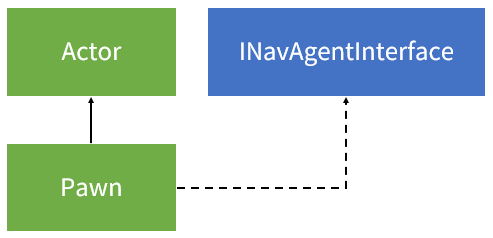
  • 언리얼 엔진에서 게임 콘텐츠를 구성하는 오브젝트의 설계 예시
    • 월드에 배치되는 모든 오브젝트 (안 움직이는 오브젝트를 포함, Actor)
    • 움직이는 오브젝트 (Pawn)
    • 길찾기 시스템을 반드시 사용하면서 움직이는 오브젝트 (INavAgentInterface 인터페이스를 구현한 Pawn)


2) 언리얼 C++ 인터페이스 특징

  • 인터페이스를 생성하면 두 개의 클래스가 생성됨
    • U로 시작하는 타입 클래스
    • I로 시작하는 인터페이스 클래스
  • 객체를 설계할 때 I 인터페이스 클래스를 사용
    • U타입 클래스 정보는 런타임에서 인터페이스 구현 여부를 파악하는 용도로 사용됨
    • 실제로 U타입 클래스에서 작업할 일은 없음
    • 인터페이스에 관련된 구성 및 구현은 I 인터페이스 클래스에서 진행
  • 추상 타입으로 강제되지 않고, 내부에 기본 함수를 구현할 수 있음
  • C++ 인터페이스의 특징
    • 추상 타입으로만 선언할 수 있는 Java, C#과 달리 언리얼은 인터페이스에도 구현이 가능함
    • 다중 상속 지원


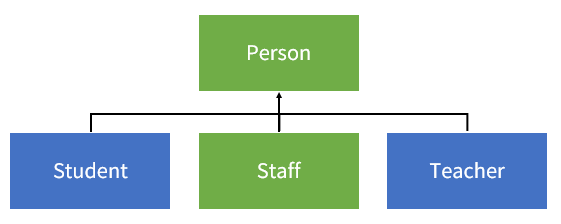
3) 예제를 위한 클래스 다이어그램

  • 수업에 참여하는 사람과 참여하지 않는 사람의 구분
    • 수업에 반드시 참여해야 하는 학교 구성원: 학생, 선생
    • 수업에 참여하지 않는 학교 구성원: 교직원
    • 수업 행동에 관련된 인터페이스: ILessonInterface


2. 언리얼 C++ 인터페이스의 활용

1) 프로젝트에 파일 복사 방법

Project Folder > Source > 파일 복사


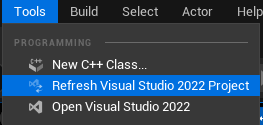
Tools > Refresh Visual Studio 2022 Project 클릭


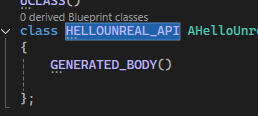
ProjectNameGameModeBase.h에 있는 키워드 복사 후 붙여넣기


2) Person, Student, Teacher, Staff 클래스 생성

  • Staff 클래스 생성 : Person 상속
// Header File

#pragma once

#include "CoreMinimal.h"
#include "Person.h"
#include "Staff.generated.h"

/**
 * 
 */
UCLASS()
class HELLOUNREAL_API UStaff : public UPerson
{
	GENERATED_BODY()
	
public:
	UStaff();
};


// Cpp File

#include "Staff.h"

UStaff::UStaff()
{
	Name = TEXT("이직원");
}


3) MyGameInstance에서 객체 생성

// Header File

#include "MyGameInstance.h" // 해당 오브젝트가 선언된 헤더가 맨 위에 있어야 함
#include "Student.h"
#include "Teacher.h"
#include "Staff.h"

UMyGameInstance::UMyGameInstance()
{
	SchoolName = TEXT("기본학교"); // CDO에 기본값으로 저장됨
}

void UMyGameInstance::Init()
{
	Super::Init();

	UE_LOG(LogTemp, Log, TEXT("============================"));

	TArray<UPerson*> Persons = { NewObject<UStudent>(), NewObject<UTeacher>(), NewObject<UStaff>() };
	for (const auto Person : Persons)
	{
		UE_LOG(LogTemp, Log, TEXT("구성원 이름 : %s"), *Person->GetName());
	}

	UE_LOG(LogTemp, Log, TEXT("============================"));
}


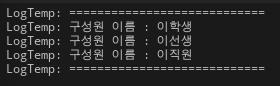
출력 결과


4) LessonInterface 인터페이스 생성

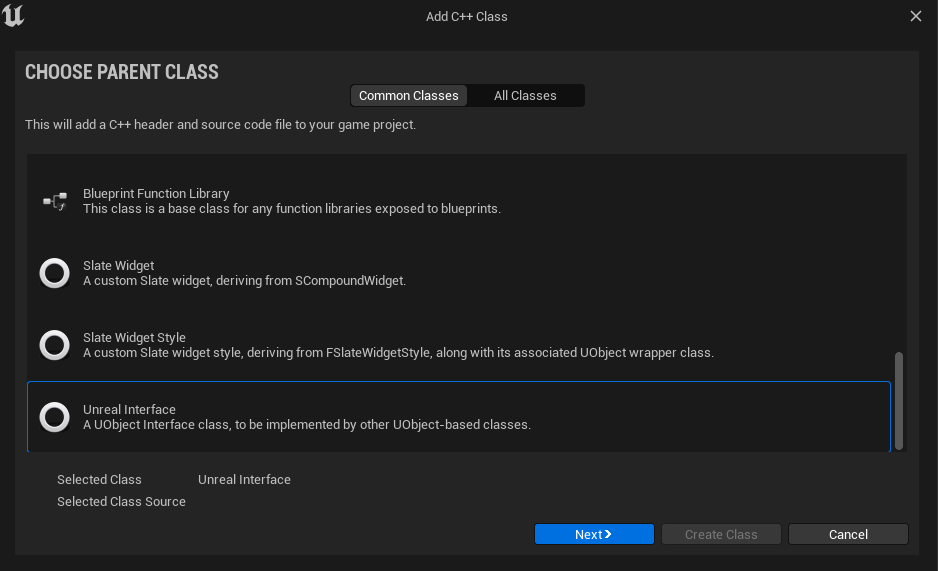
Tools > New C++ Class > Unreal Interface 선택 후 Next 버튼 클


// Fill out your copyright notice in the Description page of Project Settings.

#pragma once

#include "CoreMinimal.h"
#include "UObject/Interface.h"
#include "LessonInterface.generated.h"

// This class does not need to be modified.
UINTERFACE(MinimalAPI)
class ULessonInterface : public UInterface
{
	GENERATED_BODY()
};

/**
 * 
 */
class HELLOUNREAL_API ILessonInterface
{
	GENERATED_BODY()

public:
	// abstract 가상 함수 선언 (해당 인터페이스를 상속받는 클래스는 이 함수를 반드시 구현해야 함)
	// virtual void DoLessonMust() = 0;

	// 인터페이스에 함수를 구현해줘도 됨 (상속받은 클래스에 구현 강제X)
	virtual void DoLesson()
	{
		UE_LOG(LogTemp, Log, TEXT("수업에 입장합니다."));
	}
};


5) ILessonInterface 인터페이스 상속

  • Teacher 클래스
// Header File

#pragma once

#include "CoreMinimal.h"
#include "Person.h"
#include "LessonInterface.h"
#include "Teacher.generated.h"

/**
 * 
 */
UCLASS()
class HELLOUNREAL_API UTeacher : public UPerson, public ILessonInterface
{
	GENERATED_BODY()

public:
	UTeacher();

	virtual void DoLesson() override;
};


// Cpp File

#include "Teacher.h"

UTeacher::UTeacher()
{
	Name = TEXT("이선생");
}

void UTeacher::DoLesson()
{
	ILessonInterface::DoLesson();
	UE_LOG(LogTemp, Log, TEXT("%s님은 가르칩니다."), *Name);
}


  • Student 클래스
// Header File

#pragma once

#include "CoreMinimal.h"
#include "Person.h"
#include "LessonInterface.h"
#include "Student.generated.h" // 해당 헤더 파일이 맨 밑으로 와야 함

/**
 * 
 */
UCLASS()
class HELLOUNREAL_API UStudent : public UPerson, public ILessonInterface
{
	GENERATED_BODY()
	
public:
	UStudent();

	virtual void DoLesson() override;
};


// Cpp File

#include "Student.h"

UStudent::UStudent()
{
	Name = TEXT("이학생");
}

void UStudent::DoLesson()
{
	ILessonInterface::DoLesson();
	UE_LOG(LogTemp, Log, TEXT("%s님은 공부합니다."), *Name);
}


6) MyGameInstance에서 함수 호출

// Header File


#include "MyGameInstance.h" // 해당 오브젝트가 선언된 헤더가 맨 위에 있어야 함
#include "Student.h"
#include "Teacher.h"
#include "Staff.h"

UMyGameInstance::UMyGameInstance()
{
	SchoolName = TEXT("기본학교"); // CDO에 기본값으로 저장됨
}

void UMyGameInstance::Init()
{
	Super::Init();

	UE_LOG(LogTemp, Log, TEXT("============================"));

	TArray<UPerson*> Persons = { NewObject<UStudent>(), NewObject<UTeacher>(), NewObject<UStaff>() };
	for (const auto Person : Persons)
	{
		ILessonInterface* LessonInterface = Cast<ILessonInterface>(Person);
		if (LessonInterface)
		{
			UE_LOG(LogTemp, Log, TEXT("%s님은 수업에 참여할 수 있습니다."), *Person->GetName());
			LessonInterface->DoLesson();
		}
		else
		{
			UE_LOG(LogTemp, Log, TEXT("%s님은 수업에 참여할 수 없습니다."), *Person->GetName());
		}
	}

	UE_LOG(LogTemp, Log, TEXT("============================"));
}


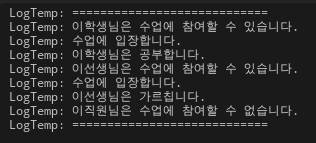
출력 결과


'게임 엔진 > Unreal' 카테고리의 다른 글

[Unreal Engine] Delegate  (0) 2025.06.16
[Unreal Engine] Composition  (0) 2025.06.16
[Unreal Engine] Reflection System  (1) 2025.06.16
[Unreal Engine] Object  (4) 2025.06.15
[Unreal Engine] 기본 타입과 문자열  (1) 2025.06.14